Reply faster,
anywhere you type.
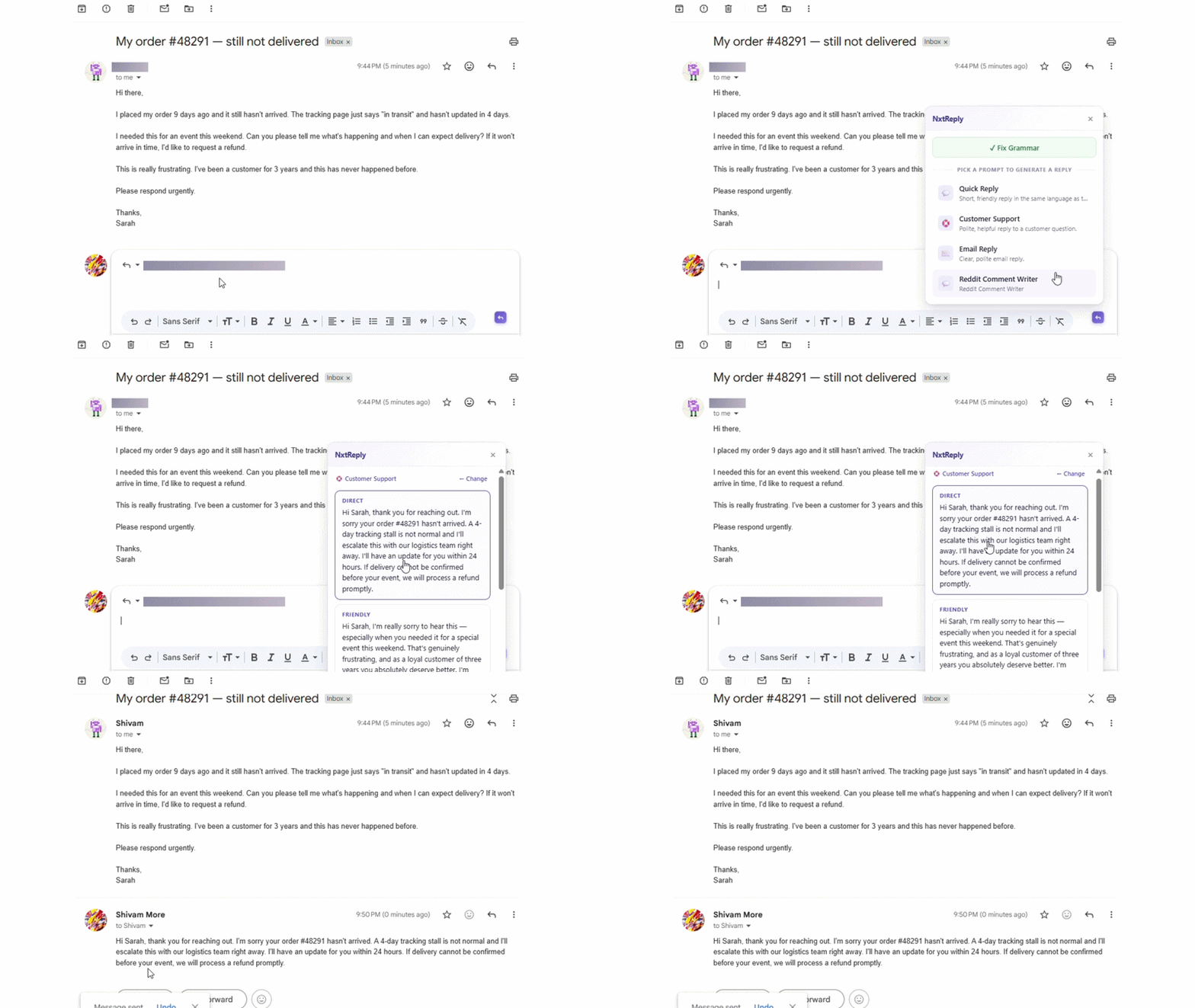
NxtReply is a Chrome extension that brings your custom AI prompts to every textbox on the web. WhatsApp, Gmail, LinkedIn, YouTube — pick a prompt, get three replies, paste in one click.
Free forever · No credit card required · 5 daily reply credits
Works on every site you reply on
Features
Built for people who type all day
One small purple badge that turns up wherever your work happens — chat, email, comments, DMs, forms.
Universal
Works on every textbox, on every website. Click into a comment box, an email, a DM — the NxtReply badge appears.
Your prompts, your library
Build a small set of prompts for the conversations you have most. Pick the right one in one click.
Three replies, every time
Direct, friendly, or call-to-action. Pick the one that fits the moment, paste, and you're done.
Grammar with preview
Fix typos and clarity issues with one click. Always shows you the diff before changing your text.
Speaks the same language
Replies match the language of the conversation — English, Hindi, Hinglish, Spanish, anything.
Private by default
Message content is never stored. Only metadata is logged so you can review your usage.
How it works
From install to first reply in 60 seconds
No onboarding wizard, no five-minute tour. The extension lights up on every textbox you focus.
Install the extension
One click from the Chrome Web Store. Sign in with your NxtReply account.
Pick or create your prompts
Five starter prompts come pre-loaded. Edit them, delete them, or write your own.
Click the badge, pick a prompt
A purple N appears in any textbox you focus. Click it, choose a prompt, and three replies are generated from the conversation around your cursor.
Use cases
Built for the conversations you keep having
Set up a prompt once. Use it forever, on any site.
Customer support
Reply to repeating questions on WhatsApp, Instagram DMs, or your help inbox without retyping the same answer.
Creators
Engage with hundreds of comments on YouTube, LinkedIn, and Reddit while keeping every reply on-brand.
Freelancers & consultants
Polish client emails, scope discussions, and proposals in seconds — without sounding like a template.
Job seekers
Answer recruiters on LinkedIn or email confidently and consistently, in your own voice.
Sales & outreach
Reply to inbound DMs and follow-ups across channels with prompts tuned for warm, not pushy.
Anyone with an inbox
If you type the same kinds of replies more than once, NxtReply will save you hours every week.
Pricing
Pay for what you use, not what you don't.
Credits are how every reply is metered. Free users get 5 reply credits per day; paid plans get a monthly pool. Top up any time. Cancel any time.
Free
For trying out NxtReply on the websites you already use.
- 5 credits / day (refreshed every 24h)
- 10 grammar fixes / day
- Standard reply quality
- Up to 5 prompts
- Works on every website
Starter
Best value for individual replies at scale.
- 1,500 credits / month
- Standard reply quality (1 credit each)
- Premium quality on demand (4 credits per reply)
- Unlimited grammar fixes
- Unlimited prompts
- Reply history
- Email support
Need a custom plan or volume seats? Contact us.
FAQ
Questions? We have answers.
Where does NxtReply work?
Anywhere you can type. NxtReply mounts on every contenteditable, input, or textarea on every website. It works the same on WhatsApp Web, Gmail, LinkedIn, YouTube comments, Slack, Notion — anywhere you have a text field.
Is my data private?
Yes. Message content is never persisted. We log only metadata about your usage (which prompt you used, response time, was it edited) so you can see analytics. The text you reply to and the replies you generate are never stored on our servers.
How is this different from a generic AI chat tool?
Two things: NxtReply lives inside your textboxes — no copying-pasting between tabs. And it uses prompts you write once and reuse, instead of typing the same instructions every time you reply.
What languages does it support?
Most major languages — English, Hindi, Hinglish, Spanish, French, German, Tamil, and more. The AI auto-matches the language of the conversation, so a Hindi message gets a Hindi reply, an English email gets an English reply. No setup needed.
What does the free tier include?
5 reply credits and 10 grammar fixes per day, up to 5 prompts, and access to the extension on every website. No credit card required.
Can I cancel anytime?
Yes. Once paid plans are live, you can cancel from your dashboard with no penalty. We don't do annual lock-ins.
Got a different question? Email us.